Menu
  • Bootcamps
    • Microsoft
      • Microsoft MCA / MCE Combo Classes
        • MCA/MCE Azure Administrator & Architect
        • MCA/MCE Azure Developer & DevOps Engineer
        • MCA/MCE MS 365 Endpoint & Admin Expert
        • MCA/MCE MS SecOps & Cyber Security Architect
        • MCA/MCE Power Platform Consult & Architect
      • Microsoft 365 Enterprise
        • MCE Microsoft 365 Administrator Expert
        • MCA Microsoft 365 Endpoint Administrator
        • MCA Microsoft 365 Teams Administrator
      • Microsoft Azure Admin
        • MCE Azure Solutions Architect
        • MCE Azure DevOps Engineer
        • MCA Azure Administrator
        • MCA Azure Network Engineer
        • MCA Azure Security Engineer
        • MCA Windows Server Hybrid Administrator
        • Microsoft Windows PowerShell
      • Microsoft Azure Data
        • MCA Azure Database Administrator
        • MCA Azure Data Analyst Power BI
        • MCA Azure Data Scientist
        • MCA Microsoft Fabric Analytics & Data Engineer
      • Microsoft Developer
        • MCE Azure DevOps Engineer
        • MCA Azure Developer
        • MCA Power Platform Developer
      • Microsoft GitHub
        • GitHub Foundations
        • GitHub Admin, Workflow, CoPilot & Advanced Security
      • Microsoft Power Platform
        • MCE Microsoft Power Platform Architect
        • MCA Power Platform Developer
        • MCA Power BI Data Analyst
      • Microsoft Security
        • MCE Cyber Security Architect Expert
        • MCA Identity & Access + Information Protection
        • MCA Azure Security Engineer
    • Amazon
      • Cloud Solutions & Architect Associate
      • Solutions Architect Associate & Professional
      • AWS Cloud Practitioner Essentials
      • Architecting on AWS
      • Advanced Architecting on AWS
      • Developing on AWS
    • Cisco
      • Cisco CCNA Associate
      • Cisco CCNP Enterprise (ENCOR, ENARSI)
      • Cisco CCNP Security (SCOR, SVPN)
      • Cisco CCCA Cybersecurity
    • CompTIA
      • CompTIA A+ Essentials
      • CompTIA Cloud+
      • CompTIA CySA+ (Cyber Security Analyst+)
      • CompTIA Network+
      • CompTIA Security+
      • CompTIA SecurityX (CASP+)
    • ISC2
      • (ISC)² CISSP
      • (ISC)² CCSP
    • VMWare
      • VMware vSphere: Install, Configure, Manage
      • VMware vSphere: Operate, Scale and Secure
      • VMware vSphere: Fast Track V8.0
    • View All Bootcamps
  • Find Training
    • Training By Job Role
      • Administrator
      • AI Engineer
      • Architect
      • Data Analyst
      • Data Engineer
      • Data Scientist
      • Developer
      • DevOps Engineer
      • Security
      • Solutions Architect
    • Microsoft Technical
      • Azure Admin
      • Azure AI
      • Azure Data
      • EndPoint Admin
      • Microsoft 365
      • Messaging
      • Power Platform
      • Security
      • Windows Server
  • Role Based Certifications
  • Pay an Invoice
1-844-BOOTCAMP
or 1-941-218-0007
Certification Camps
  • Bootcamps
    • Microsoft
      • Microsoft MCA / MCE Combo Classes
        • MCA/MCE Azure Administrator & Architect
        • MCA/MCE Azure Developer & DevOps Engineer
        • MCA/MCE MS 365 Endpoint & Admin Expert
        • MCA/MCE MS SecOps & Cyber Security Architect
        • MCA/MCE Power Platform Consult & Architect
      • Microsoft 365 Enterprise
        • MCE Microsoft 365 Administrator Expert
        • MCA Microsoft 365 Endpoint Administrator
        • MCA Microsoft 365 Teams Administrator
      • Microsoft Azure Admin
        • MCE Azure Solutions Architect
        • MCE Azure DevOps Engineer
        • MCA Azure Administrator
        • MCA Azure Network Engineer
        • MCA Azure Security Engineer
        • MCA Windows Server Hybrid Administrator
        • Microsoft Windows PowerShell
      • Microsoft Azure Data
        • MCA Azure Database Administrator
        • MCA Azure Data Analyst Power BI
        • MCA Azure Data Scientist
        • MCA Microsoft Fabric Analytics & Data Engineer
      • Microsoft Developer
        • MCE Azure DevOps Engineer
        • MCA Azure Developer
        • MCA Power Platform Developer
      • Microsoft GitHub
        • GitHub Foundations
        • GitHub Admin, Workflow, CoPilot & Advanced Security
      • Microsoft Power Platform
        • MCE Microsoft Power Platform Architect
        • MCA Power Platform Developer
        • MCA Power BI Data Analyst
      • Microsoft Security
        • MCE Cyber Security Architect Expert
        • MCA Identity & Access + Information Protection
        • MCA Azure Security Engineer
    • Amazon
      • Cloud Solutions & Architect Associate
      • Solutions Architect Associate & Professional
      • AWS Cloud Practitioner Essentials
      • Architecting on AWS
      • Advanced Architecting on AWS
      • Developing on AWS
    • Cisco
      • Cisco CCNA Associate
      • Cisco CCNP Enterprise (ENCOR, ENARSI)
      • Cisco CCNP Security (SCOR, SVPN)
      • Cisco CCCA Cybersecurity
    • CompTIA
      • CompTIA A+ Essentials
      • CompTIA Cloud+
      • CompTIA CySA+ (Cyber Security Analyst+)
      • CompTIA Network+
      • CompTIA Security+
      • CompTIA SecurityX (CASP+)
    • ISC2
      • (ISC)² CISSP
      • (ISC)² CCSP
    • VMWare
      • VMware vSphere: Install, Configure, Manage
      • VMware vSphere: Operate, Scale and Secure
      • VMware vSphere: Fast Track V8.0
    • View All Bootcamps
  • Find Training
    • Training By Job Role
      • Administrator
      • AI Engineer
      • Architect
      • Data Analyst
      • Data Engineer
      • Data Scientist
      • Developer
      • DevOps Engineer
      • Security
      • Solutions Architect
    • Microsoft Technical
      • Azure Admin
      • Azure AI
      • Azure Data
      • EndPoint Admin
      • Microsoft 365
      • Messaging
      • Power Platform
      • Security
      • Windows Server
  • Role Based Certifications
  • Pay an Invoice
MCA Microsoft Identity & Access Admin + MCA Microsoft Information Protection Admin – 6 Days (2 Courses, 2 Exams, 2 Certs)
Exam Pass Guarantee
Bootcamps / Microsoft Security

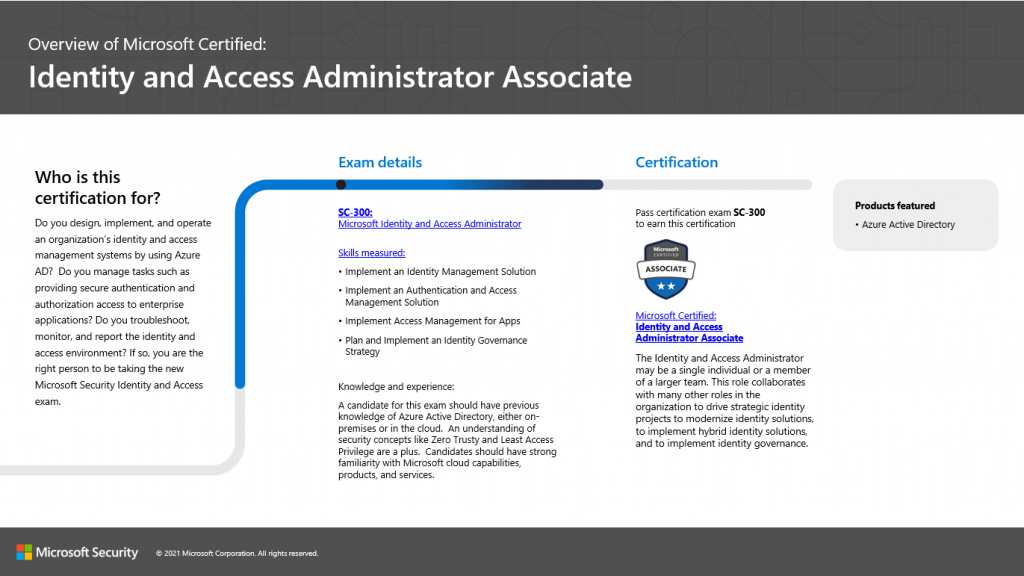
Microsoft Identity and Access Management Certification

Transform Your Career In 6 days
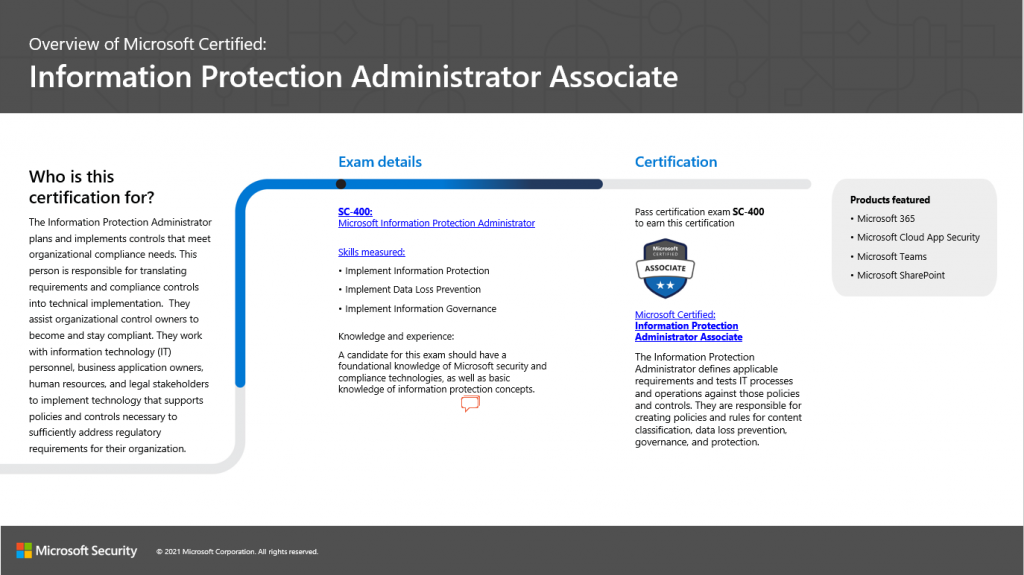
Attend this boot camp and become a Microsoft Identity & Access Admin + MCA Microsoft Information Protection Admin. Students will take two exams SC-300 (Microsoft Identity and Access Administrator) and SC-401 (Microsoft Information Security Administrator) to achieve the MCA Identity & Access Admin + MCA Microsoft Information Protection Admin Certifications. This hands-on, instructor-led live camp focuses on the real-world responsibilities of a Security Administrator and covers the information needed for the certification exams which are administered while attending.
View Pricing Download Course Details
Course Essentials

Training Overview

MCA Microsoft Identity & Access Admin + MCA Microsoft Information Protection Admin – 6 Days (2 Courses, 2 Exams, 2 Certs)
Delivery Options
Classroom Live
Remote Classroom Live
Duration 6 days
Exams SC-300 & SC-401
Certifications MCA Identity & Access Admin + MCA Microsoft Information Protection Admin
Vouchers Test & One Retake Voucher Per Exam (if needed)
Certification Badge
What's Included

Everything You Need To Succeed

  • 2 Microsoft Test Vouchers
  • 2 Microsoft Official Courses
  • 1 Retake Voucher Per Exam
  • Microsoft Study Labs & Sims
  • Onsite Pearson Vue Test
  • Instructor Led Classroom Training
Boot Camp Pricing

Training Schedule and Cost

Our training model blends knowledge and certification prep into one solution. You can interact face-to-face with vendor-certified trainers at our training facilities or attend the same instructor-led live camp online.

Select Delivery Format:
Classroom Live
Remote Classroom Live
Check Box To Include:
  • Jan
    26
    2026
    Delivery Format:
    CLASSROOM LIVE
    Date:
    01.26.2026 - 01.31.2026
    Location:
    SARASOTA, FL
    Price Includes:
    Instructor Led Class, Official Courseware, Labs and Exams
    $4,495
    6 days
    Enroll Generate a Quote Ask a Question
  • Feb
    23
    2026
    Delivery Format:
    CLASSROOM LIVE
    Date:
    02.23.2026 - 02.28.2026
    Location:
    SARASOTA, FL
    Price Includes:
    Instructor Led Class, Official Courseware, Labs and Exams
    $4,495
    6 days
    Enroll Generate a Quote Ask a Question
  • Mar
    16
    2026
    Delivery Format:
    CLASSROOM LIVE
    Date:
    03.16.2026 - 03.21.2026
    Location:
    SARASOTA, FL
    Price Includes:
    Instructor Led Class, Official Courseware, Labs and Exams
    $4,495
    6 days
    Enroll Generate a Quote Ask a Question
  • [View Entire Schedule]
  • Apr
    27
    2026
    Delivery Format:
    CLASSROOM LIVE
    Date:
    04.27.2026 - 05.02.2026
    Location:
    SARASOTA, FL
    Price Includes:
    Instructor Led Class, Official Courseware, Labs and Exams
    $4,495
    6 days
    Enroll Generate a Quote Ask a Question
  • May
    18
    2026
    Delivery Format:
    CLASSROOM LIVE
    Date:
    05.18.2026 - 05.23.2026
    Location:
    SARASOTA, FL
    Price Includes:
    Instructor Led Class, Official Courseware, Labs and Exams
    $4,495
    6 days
    Enroll Generate a Quote Ask a Question
  • Jun
    22
    2026
    Delivery Format:
    CLASSROOM LIVE
    Date:
    06.22.2026 - 06.27.2026
    Location:
    SARASOTA, FL
    Price Includes:
    Instructor Led Class, Official Courseware, Labs and Exams
    $4,495
    6 days
    Enroll Generate a Quote Ask a Question
  • Jul
    27
    2026
    Delivery Format:
    CLASSROOM LIVE
    Date:
    07.27.2026 - 08.01.2026
    Location:
    SARASOTA, FL
    Price Includes:
    Instructor Led Class, Official Courseware, Labs and Exams
    $4,495
    6 days
    Enroll Generate a Quote Ask a Question
  • Aug
    17
    2026
    Delivery Format:
    CLASSROOM LIVE
    Date:
    08.17.2026 - 08.22.2026
    Location:
    SARASOTA, FL
    Price Includes:
    Instructor Led Class, Official Courseware, Labs and Exams
    $4,495
    6 days
    Enroll Generate a Quote Ask a Question
  • Sep
    28
    2026
    Delivery Format:
    CLASSROOM LIVE
    Date:
    09.28.2026 - 10.03.2026
    Location:
    SARASOTA, FL
    Price Includes:
    Instructor Led Class, Official Courseware, Labs and Exams
    $4,495
    6 days
    Enroll Generate a Quote Ask a Question
Syllabus

Course Description

The MCA Microsoft Identity & Access Admin + MCA Microsoft Information Protection Admin - 6 day Boot Camp prepares students to esign, implement, and operate an organization’s identity and access management systems by using Microsoft Entra ID. The camp also teaches administrators how to creat policies and rules for content classification, data loss prevention, governance, and protection.

The MCA Microsoft Identity & Access Admin + MCA Microsoft Information Protection Admin Associate boot camp is taught using TWO Microsoft Official Courseware Courses

SC-300T00: Microsoft Identity and Access Administrator

SC-401T00: Information Security Administrator

While attending this 6 day camp - students will take two exams (SC-300 / SC-401) to achieve TWO Microsoft Certifications -  Microsoft Certified: Identity and Access Administrator Associate - AND - Microsoft Certified: Information Protection Administrator Associate Certifications.  This hands on, instructor led live camp focuses on the real world responsibilities of an Microsoft Security Administrator covering the information needed for the certification exams which are administered while attending.

Skills Gained:

Explore identity in Microsoft Entra ID
Create, configure, and manage identities
Implement and manage external identities
Implement and manage hybrid identity
Implement an Authentication and Access Management solution
Implement Access Management for Apps
Plan and implement an identity governance strategy

Implement Microsoft Purview Information Protection
Implement and manage Microsoft Purview Data Loss Prevention
Implement and manage Microsoft Purview Insider Rish Management
Protect data in AI environments with Microsoft Purview
Implement and manage Microsoft 365 retention and recovery
Audit and search activity in Microsoft Purview


MCA Microsoft Identity & Access Admin + MCA Microsoft Information Protection Admin – 6 Days (2 Courses, 2 Exams, 2 Certs)
  • Topics Covered
  • Identity & Access Overview
  • Identity Protection Overview
  • Facilities

Topics Covered in this Official Boot Camp

Explore identity in Microsoft Entra IDImplement initial configuration of Microsoft Entra IDCreate, configure, and manage identitiesImplement and manage external identitiesImplement and manage hybrid identitySecure Microsoft Entra users with multifactor authenticationManage user authenticationPlan, implement and administer Conditional AccessManage MIcrosoft Entra Identity ProtectionImplement access management for Azure resourcesDeploy and Configure Microsoft Entra Global Secure AccessPlan and design the integration of enterprise apps for SSOImplement and monitor the integration of enterprise apps SSOImplement app registrationRegister apps using Microsoft Entra IDPlan and implement entitlement managementPlan, implement and manage access reviewPlan and implement privileged accessMonitor and maintain Microsoft Entra IDPrtect sensitive data in a digital worldClassify data for protection and governanceReview and analyze data classification and protectionCreate and manage sensitive information typesCreate and configure sensitivity labels with Microsoft PurviewApply sensitivity labels for data protectionClassify and protect on-premises data with Microsoft PurviewUnderstand Microsoft 365 encryptionProtect email with Microsoft Purview Message EncryptionPrevent data loss in MIcrosoft PurviewImplement endpoint data loss prevention (DLP) with Microsoft PurviewConfigure DLP policies for Microsoft Defender for Cloud Apps and Power PlatformInvestigate and respond to MIcrosoft Purview Data Loss Prevention alertsUnderstand Microsoft Purview Insider Risk ManagementPrepare for Microsoft Purview Insider Risk ManagementCreate and manage Insider Risk Management policiesInvestigate insider risk alerts and related activityImplement Adaptive Protection in Insider Risk ManagementDiscover AI interactions with Microsoft PurviewProtect sensitive data from AI-related risksGovern AI usage with Microsoft PurviewAsses and mitigate AI risks with Microsoft PurviewUnderstand retention in Microsoft PurviewImplement and manage Microsoft 365 retention and recoverySearch and investigate with Microsoft Purview AuditSearch for content with Microsoft Purview eDiscovery
Explore identity in Microsoft Entra ID

Explore identity in Microsoft Entra ID

Introduction
Explain the identity landscape
Explore Zero Trust with identity
Discuss identity as a control plane
Explore why we have identity
Define identity administration
Contrast decentralized identity with central identity systems
Discuss identity management solutions
Explain Microsoft Entra Business to Business
Compare Microsoft identity providers
Define identity licensing
Explore authentication
Discuss authorization

Implement initial configuration of Microsoft Entra ID

Implement initial configuration of Microsoft Entra ID

Introduction
Configure company brand
Configure and manage Microsoft Entra roles
Exercise manage users roles
Configure delegation by using administrative units
Analyze Microsoft Entra role permissions
Configure and manage custom domains
Configure tenant-wide setting

Create, configure, and manage identities

Create, configure, and manage identities

Introduction
Create, configure, and manage users
Exercise – assign licenses to users
Exercise – restore or remove deleted users
Create, configure, and manage groups
Exercise – add groups in Microsoft Entra ID
Configure and manage device registration
Manage licenses
Exercise – change group license assignments
Exercise – change user license assignments
Create custom security attributes
Explore automatic user creation

Implement and manage external identities

Implement and manage external identities

Introduction
Describe guest access and Business to Business accounts
Manage external collaboration
Exercise – configure external collaboration
Invite external users – individually and in bulk
Exercise – add guest users to directory
Exercise – invite guest users bulk
Demo – manage guest users in Microsoft Entra ID
Manage external user accounts in Microsoft Entra ID
Manage external users in Microsoft 365 workloads
Exercise – explore dynamic groups
Implement and manage Microsoft Entra Verified ID
Configure identity providers
Implement cross-tenant access controls

Implement and manage hybrid identity

Implement and manage hybrid identity

Introduction
Plan, design, and implement Microsoft Entra Connect
Implement manage password hash synchronization (PHS)
Implement manage pass-through authentication (PTA)
Demo – Manage pass-through authentication and seamless single sign-on (SSO)
Implement and manage federation
Trouble-shoot synchronization errors
Implement Microsoft Entra Connect Health
Manage Microsoft Entra Health

Secure Microsoft Entra users with multifactor authentication

Secure Microsoft Entra users with multifactor authentication

Introduction
What is Microsoft Entra multifactor authentication?
Plan your multifactor authentication deployment
Exercise – Enable Microsoft Entra multifactor authentication
Configure multifactor authentication methods

Manage user authentication

Manage user authentication

Introduction
Administer FIDO2 and passwordless authentication methods
Explore Authenticator app and OATH tokens
Implement an authentication solution based on Windows Hello for Business
Exercise configure and deploy self-service password reset
Deploy and manage password protection
Configure smart lockout thresholds
Exercise – Manage Microsoft Entra smart lockout values
Implement Kerberos and certificate-based authentication in Microsoft Entra ID
Configure Microsoft Entra user authentication for virtual machines

Plan, implement and administer Conditional Access

Plan, implement and administer Conditional Access

Introduction
Plan security defaults
Exercise – Work with security defaults
Plan Conditional Access policies
Implement Conditional Access policy controls and assignments
Exercise – Implement Conditional Access policies roles and assignments
Test and troubleshoot Conditional Access policies
Implement application controls
Implement session management and continuous access evaluation
Exercise – Configure authentication session controls
Microsoft Entra Conditional Access Optimization agent

Manage MIcrosoft Entra Identity Protection

Manage MIcrosoft Entra Identity Protection

Introduction
Review identity protection basics
Implement and manage user risk policy
Exercise enable sign-in risk policy
Exercise configure Microsoft Entra multifactor authentication registration policy
Monitor, investigate, and remediate elevated risky users
Implement security for workload identities
Explore Microsoft Defender for Identity

Implement access management for Azure resources

Implement access management for Azure resources

Introduction
Assign Azure roles
Configure custom Azure roles
Create and configure managed identities
Access Azure resources with managed identities
Analyze Azure role permissions
Configure Azure Key Vault RBAC policies
Retrieve objects from Azure Key Vault
Explore Microsoft Entra Permissions Management

Deploy and Configure Microsoft Entra Global Secure Access

Deploy and Configure Microsoft Entra Global Secure Access

Introduction
Explore Global Secure Access
Deploy and configure Microsoft Entra Internet Access
Deploy and configure Microsoft Entra Private Access
Explore how to use the Dashboard to drive Global Secure Access
Create remote networks for use with Global Secure Access
Use Conditional Access with Global Secure Access
Explore logs and monitoring options with Global Secure Access

Plan and design the integration of enterprise apps for SSO

Plan and design the integration of enterprise apps for SSO

Introduction
Discover apps by using Microsoft Defender for Cloud Apps and Active Directory Federation Services app report
Configure connectors to apps
Exercise implement access management for apps
Design and implement app management roles
Exercise create a custom role to manage app registration
Configure preintegrated gallery SaaS apps
Implement and manage policies for OAuth apps

Implement and monitor the integration of enterprise apps SSO

Implement and monitor the integration of enterprise apps SSO

Introduction
Implement token customizations
Implement and configure consent settings
Integrate on-premises apps with Microsoft Entra application proxy
Integrate custom SaaS apps for single sign-on
Implement application-based user provisioning
Monitor and audit access to Microsoft Entra integrated enterprise applications
Create and manage application collections

Implement app registration

Implement app registration

Introduction
Plan your line of business application registration strategy
Implement application registration
Register an application
Configure permission for an application
Grant tenant-wide admin consent to applications
Implement application authorization
Exercise add app roles to an application and receive tokens
Manage and monitor application by using app governance

Register apps using Microsoft Entra ID

Register apps using Microsoft Entra ID

Introduction
Plan for app registration
Explore application objects and service principals
Create app registrations
Configure app authentication
Configure API permissions
Create app roles

Plan and implement entitlement management

Plan and implement entitlement management

Introduction
Define access packages
Exercise create and manage a resource catalog with Microsoft Entra entitlement management
Configure entitlement management
Exercise add terms of use acceptance report
Exercise manage the lifecycle of external users with Microsoft Entra identity governance
Configure and manage connected organizations

Plan, implement and manage access review

Plan, implement and manage access review

Introduction
Plan for access reviews
Create access reviews for groups and apps
Create and configure access reviews programmatically
Monitor access review findings
Automate access review management tasks
Configure recurring access reviews

Plan and implement privileged access

Plan and implement privileged access

Introduction
Define a privileged access strategy for administrative users
Configure Privileged Identity Management for Azure resources
Exercise configure Privileged Identity Management for Microsoft Entra roles
Exercise assign Microsoft Entra roles in Privileged Identity Management
Exercise assign Azure resource roles in Privileged Identity Management
Plan and configure Privileged Access Groups
Analyze Privileged Identity Management audit history and reports
Create and manage emergency access accounts

Monitor and maintain Microsoft Entra ID

Monitor and maintain Microsoft Entra ID

Introduction
Analyze and investigate sign-in logs to troubleshoot access issues
Review and monitor Microsoft Entra audit logs
Exercise connect data from Microsoft Entra ID to Microsoft Sentinel
Export logs to third-party security information and event management system
Analyze Microsoft Entra workbooks and reporting
Monitor security posture with Identity Secure Score

Prtect sensitive data in a digital world

Prtect sensitive data in a digital world

Introduction
The growing need for data protection
The challenges of managing sensitive data
Protect data in a Zero Trust world
Understand data classification and protection
Prevent data leaks and insider threats
Manage security alerts and respond to threats
Protect AI-generated and AI-processed data

Classify data for protection and governance

Classify data for protection and governance

Introduction
Data classification overview
Classify data using sensitive information types
Classify data using trainable classifiers
Create a custom trainable classifier

Review and analyze data classification and protection

Review and analyze data classification and protection

Introduction
Review classification and protection insights
Analyze classified data with data and content explorer
Monitor and review actions on labeled data

Create and manage sensitive information types

Create and manage sensitive information types

Introduction
Sensitive information type overview
Compare built-in versus custom sensitive information types
Create and manage custom sensitive information types
Create and manage exact data match sensitive info types
Implement document fingerprinting
Describe named entities
Create a keyword dictionary

Create and configure sensitivity labels with Microsoft Purview

Create and configure sensitivity labels with Microsoft Purview

Introduction
Sensitivity label overview
Create and configure sensitivity labels and label policies
Configure encryption with sensitivity labels
Implement auto-labeling policies
Track and evaluate sensitivity label usage in Microsoft Purview

Apply sensitivity labels for data protection

Apply sensitivity labels for data protection

Introduction
Foundations of sensitivity label integration in Microsoft 365
Manage sensitivity labels in Office apps
Apply sensitivity labels with Microsoft 365 Copilot for secure collaboration
Protect meetings with sensitivity labels
Apply sensitivity labels to Microsoft Teams, Microsoft 365 groups, and SharePoint sites

Classify and protect on-premises data with Microsoft Purview

Classify and protect on-premises data with Microsoft Purview

Introduction
Protect on-premises files with Microsoft Purview
Prepare your environment for the Microsoft Purview Information Protection scanner
Configure and install the Microsoft Purview Information Protection scanner
Run and manage the scanner
Enforce data loss prevention policies on on-premises files

Understand Microsoft 365 encryption

Understand Microsoft 365 encryption

Introduction to Microsoft 365 encryption
Learn how Microsoft 365 data is encrypted at rest
Understand service encryption in Microsoft Purview
Explore customer key management using Customer Key
Learn how data is encrypted in-transit

Protect email with Microsoft Purview Message Encryption

Protect email with Microsoft Purview Message Encryption

Introduction
Understand message encryption
Plan for Microsoft Purview Message Encryption
Configure Microsoft Purview Message Encryption
Customize encrypted email branding with Microsoft Purview
Control encrypted email access with Advanced Message Encryption
Use Microsoft Purview Message Encryption templates in mail flow rules

Prevent data loss in MIcrosoft Purview

Prevent data loss in MIcrosoft Purview

Introduction
Data loss prevention overview
Plan and design DLP policies
Understand DLP policy deployment and simulation mode
Create and manage DLP policies
Integrate Adaptive Protection with DLP
Use DLP analytics (preview) to identify data risks
Understand DLP alerts and activity tracking

Implement endpoint data loss prevention (DLP) with Microsoft Purview

Implement endpoint data loss prevention (DLP) with Microsoft Purview

Introduction
Endpoint data loss prevention (DLP) overview
Understand the endpoint DLP implementation workflow
Onboard devices for endpoint DLP
Configure settings for endpoint DLP
Create and manage endpoint DLP policies
Deploy the Microsoft Purview browser extension
Configure just-in-time (JIT) protection

Configure DLP policies for Microsoft Defender for Cloud Apps and Power Platform

Configure DLP policies for Microsoft Defender for Cloud Apps and Power Platform

Introduction
Configure data loss prevention policies for Power Platform
Integrate data loss prevention in Microsoft Defender for Cloud Apps
Configure policies in Microsoft Defender for Cloud Apps
Manage data loss prevention violations in Microsoft Defender for Cloud Apps

Investigate and respond to MIcrosoft Purview Data Loss Prevention alerts

Investigate and respond to MIcrosoft Purview Data Loss Prevention alerts

Understand data loss prevention (DLP) alerts
Understand the DLP alert lifecycle
Configure DLP policies to generate alerts
Investigate DLP alerts in Microsoft Purview
Investigate DLP alerts in Microsoft Defender XDR
Respond to DLP alerts

Understand Microsoft Purview Insider Risk Management

Understand Microsoft Purview Insider Risk Management

What is an insider risk?
Microsoft Purview Insider Risk Management overview
Microsoft Purview Insider Risk Management features

Prepare for Microsoft Purview Insider Risk Management

Prepare for Microsoft Purview Insider Risk Management

Plan for Insider Risk Management
Prepare your organization for Insider Risk Management
Configure settings for Insider Risk Management
Integrate Insider Risk Management with data sources and tools

Create and manage Insider Risk Management policies

Create and manage Insider Risk Management policies

Understand Insider Risk Management policy templates
Compare quick and custom insider risk policies
Create a custom Insider Risk Management policy
Manage policies in Insider Risk Management

Investigate insider risk alerts and related activity

Investigate insider risk alerts and related activity

Understand insider risk alerts and investigations
Manage alert volume in insider risk management
Investigate and triage insider risk alerts in Microsoft Purview
Analyze alert context with the All risk factors tab
Investigate activity details with the Activity explorer tab
Review patterns over time with the User activity tab
Investigate insider risk alerts in Microsoft Defender XDR
Manage and take action on insider risk cases

Implement Adaptive Protection in Insider Risk Management

Implement Adaptive Protection in Insider Risk Management

Adaptive Protection overview
Understand and configure risk levels in Adaptive Protection
Configure Adaptive Protection
Manage Adaptive Protection

Discover AI interactions with Microsoft Purview

Discover AI interactions with Microsoft Purview

Understand AI security risks
Microsoft Purview Data Security Posture Management (DSPM) for AI overview
Configure DSPM for AI
Review AI security reports
Audit Microsoft 365 Copilot activities and AI interactions with Microsoft Purview

Protect sensitive data from AI-related risks

Protect sensitive data from AI-related risks

Apply AI security recommendations with DSPM for AI
Use sensitivity labels to protect Microsoft 365 Copilot content
Use Endpoint DLP to prevent generative AI data exposure

Govern AI usage with Microsoft Purview

Govern AI usage with Microsoft Purview

Apply retention policies to Microsoft 365 Copilot prompts and responses
Investigate and delete Copilot interactions with Microsoft Purview eDiscovery
Detect and manage Copilot and AI communications with Microsoft Purview

Asses and mitigate AI risks with Microsoft Purview

Asses and mitigate AI risks with Microsoft Purview

Use data assessments to detect oversharing risks
Detect risky AI usage with Insider Risk Management

Understand retention in Microsoft Purview

Understand retention in Microsoft Purview

Overview of retention and the data lifecycle
Understand retention labels and retention policies
Decide when to apply retention

Implement and manage Microsoft 365 retention and recovery

Implement and manage Microsoft 365 retention and recovery

Plan for retention and disposition with retention labels
Create and publish retention labels
Create and manage auto-apply retention labels
Create and configure adaptive scopes
Create and configure retention policies
Understand policy and label precedence in Microsoft Purview
Recover content in Microsoft 365 workloads

Search and investigate with Microsoft Purview Audit

Search and investigate with Microsoft Purview Audit

Microsoft Purview Audit overview
Configure and manage Microsoft Purview Audit
Conduct searches with Audit (Standard)
Audit Microsoft Copilot for Microsoft 365 interactions
Investigate activities with Audit (Premium)
Export audit log data
Configure audit retention with Audit (Premium)

Search for content with Microsoft Purview eDiscovery

Search for content with Microsoft Purview eDiscovery

Understand eDiscovery and content search capabilities
Prerequisites for using eDiscovery in Microsoft Purview
Create an eDiscovery search
Conduct an eDiscovery search
Export eDiscovery search results

CERTIFICATION CAMPS FACILITIES

CAMPUS - Certification Camps built out a stand alone training center (not a hotel conference room) with spacious classrooms, new desk, Herman Miller Aeron chairs & comfortable common areas. Each student has a dedicated desk with two monitors. Each classroom has a maximum of two rows - so everyone is able to be engaged without the "back row" feeling.

CLASSROOM EQUIPMENT - Students work on a dedicated Dell Client Desktop with 32GB memory with 512GB SSD drives - All Labs are executed the extremely fast Microsoft Data Center Hosted Lab Environment .

CAMPUS INTERNET - The campus is connected with a 1Gbps (1,000 Mbps) Verizon Fios Business Connection which provides complete internet (including VPN) access for students.

COMMON AREA - Amenties including snacks, drinks (Coffee, 100% juices, sodas, etc) all complimentary.

LODGING - We use the Hyatt Place Lakewood Ranch. This "upgraded" hotel offers extremely comfortable beds, great breakfast and very fast  internet access.

NEAR BY - Many shops, restaurants and grocery options are available within walking distance. Additionally - the hotel provided scheduled shuttle services. Restaurants like Cheesecake Factory, California Pizza Kitchen, Panera Bread, Bone Fish Grill, Ruby Tuesday's, Five Guys, Chipotle, Chili's and over 20 additional choices in the immediate area.

What's Included

Live Training
Accelerated Live Training by Certified Trainers
Exam Voucher
Exam voucher
Exam Pass Guarantee
One Retake Voucher Per exam, if Needed
Satisfaction Guarantee
Re-sit Your Class at no Additional Charge up to 6 Months
Practice Exams
Vetted and Monthly Updated Practice Exam Resources
Extended Access
90-day Extended Access to Boot Camps Components
How it Works

How Does the Certification Camps Boot Camps Work?

Start your learning immediately with access to content as soon as your registration is processed.
1
Step 1
Before the Boot Camp
Start learning now. Once your registration is processed, you will receive access to materials. Prepare for your live boot camp, identify knowledge gaps to maximize your boot camp experience.
2
Step 2
During the Boot Camp
Attend instructor led live training at our facility in Florida or online (same class, same instructor, same interaction). In person or online – you are actively engaged with the instructor and other students participating in presentations, labs, hands on demonstrations and other learning tools. Students take the certification exam(s) while attending the camp.
3
Step 3
After the Boot Camp
Continue to access your student lab environment for 90 days after your camp is over. In the event you need to defer your exams or would like to re-sit the training – you have up to 6 months after the camp is complete.
Popular Bootcamps

Students Also Like

Course Logo
Microsoft Azure Security Bootcamp (AZ-500 Training)
Attend this 5 day bootcamp to pass AZ-500 and become a Microsoft Azure Security Engineer. Instructor-led bootcamp training.
5 days
Exam AZ-500
MCA Microsoft Azure Security Engineer
Course Logo
Microsoft Cybersecurity & Sec Ops Bootcamp (SC-100, SC-200)
This bootcamp covers both SC-100 and SC-200 for the Security Ops and Cybersecurity Atchitect Expert Certifications
6 days
SC-100 & SC-200
MCE Cybersecurity Architect Expert & MCA Microsoft Security Operations Analyst Associate
Course Logo
Azure Administrator Certification Bootcamp - 6 Days
Pass the AZ-900 and AZ-104 exams to earn two Azure certifications. The Azure Fundamentals and Azure Administrator Certification.
6 days
Exams AZ-900 & AZ-104
MCA Azure Administrator & Microsoft Azure Foundations
Guaranteed Results

The Certification Camps Difference

Expert Instructors
We guarantee you’ll pass your exam or you can retake the class for free.
Guaranteed Classes
Our classes run as scheduled, no cancellations, ensuring you can plan ahead.
High Exam Pass Rate
95% of our students pass their certification exams on first attempt.
20+ Years Experience
With over 20 years in training, we’ve helped thousands achieve certification success.
Your Questions Answered
What is the difference between a bootcamp and a traditional class?
+
At Certification Camps, we offer instructor-led, accelerated training programs—commonly referred to as “bootcamps.” Unlike traditional classroom courses that span weeks or months, our bootcamps are designed to deliver intensive, focused learning in a much shorter timeframe. This means students can master key technologies and prepare for certification in just a few days, without sacrificing quality or depth of instruction.
My company is paying for training. Can I get a quote for approval and an invoice?
+
Yes! You can use the “Generate a Quote” button on our website to receive an instant, formal quote for approval. Once you’re ready and complete registration, an invoice will be sent to you automatically.
Are these bootcamps the official vendor certified courses?
+
Yes – Certification Camps is a certified training partner for all vendors on our website, all training materials are official courseware (no third-party courseware).
Are exams administered while attending the training?
+
Yes – if you attend in person – the exams are administered at our training facility by Pearson Vue. If you are attending online – you have the option to take the exam online or we will provide you with a voucher to take the exam at a local Pearson Vue test center.
Are these courses instructor led live training events?
+
Yes – every bootcamp regardless of in person (at our Florida training center) or online are the same instructor led live training events. You see the instructor, interact with the instructor, view the instructors screen – the instructor is able to assist with labs, answer questions – completely the same experience if you attend online or in-person.
Are your instructor’s vendor certified?
+
Yes – every instructor is certified by the related vendor. For example – every instructor delivering our Microsoft bootcamps are Microsoft Certified Trainers (MCT), every instructor delivering Amazon AWS are Amazon Authorized Instructors (AAI).
Can I attend your instructor led live courses in Florida?
+
Yes – regardless of where you are located – you can attend any of our bootcamp from our facility in Sarasota, FL. In addition to the training – we offer an add on optional domestic travel option which includes up to $500 in airfare and lodging starting the day of the camp and checking out on the final day of camp.

About

  • Blog
  • Contact Us
  • Reviews
  • Locations

Bootcamps

  • Amazon Web Services
  • Microsoft 365 Enterprise
  • Microsoft Azure Admin
  • Microsoft Developer
  • Microsoft Power Platform
  • Microsoft Security
  • Windows Server
  • Windows Client

Vendors

  • Amazon
  • Cisco
  • CompTia
  • Microsoft

Job Role

  • Administrator
  • Architect
  • Data Engineer
  • Developer
  • DevOps
  • Security

Registration

  • More Info
  • Pay Invoice
  • Register for a Bootcamp

Copyright © 2025 Certification Camps. All rights reserved.

  • Terms & Conditions
  • Privacy Policy