
MCE Microsoft Azure Solutions Architect Training & Certification Boot Camp – 5 Days (1 Courses, 1 Exams, 1 Cert)
Training Schedule and Pricing
Our training model blends knowledge and certification prep into one solution. Interact face-to-face with vendor certified trainers AT OUR TRAINING CENTER IN SARASOTA, FL - OR - attend the same instructor-led live camp ONLINE.
-
May132024Delivery Format:CLASSROOM LIVEDate:05.13.2024 - 05.17.2024Location:SARASOTAPrice Includes:Instructor Led Class, Official Courseware, Labs and Exams$3,9955 days
-
Jun102024Delivery Format:CLASSROOM LIVEDate:06.10.2024 - 06.14.2024Location:SARASOTAPrice Includes:Instructor Led Class, Official Courseware, Labs and Exams$3,9955 days
-
Jul222024Delivery Format:CLASSROOM LIVEDate:07.22.2024 - 07.26.2024Location:SARASOTAPrice Includes:Instructor Led Class, Official Courseware, Labs and Exams$3,9955 days



Exam Included & Administered During Camp:
AZ-305: Designing Microsoft Azure Infrastructure Solutions
Please note - Microsoft requires the Azure Admin certification in order to obtain Azure Solutions Architect

What's Included
 1 Microsoft Test Voucher
 1 Microsoft Official Course
- 1 Retake Voucher (if needed)
- Microsoft Data Center Labs
 Onsite Cert Testing
- Live Instructor Training
 1 Microsoft Test Voucher
 1 Microsoft Official Course
 1 Retake Voucher (if needed)
 Microsoft Data Center Labs
 Onsite Cert Testing
 Live Instructor Training
IMPORTANT PREREQUISITE NOTE - The MCA Azure Administrator certification is a prerequisite of the MCE Azure Architect. Certification Camps offers a COMBO boot camp covering both MCA Azure Admin & MCE Azure Architect accessible with this link.
The Microsoft Certified Azure Solutions Architect Training & Certification 5 Day Boot Camp focuses on actual job task teaching students how to advise stakeholders and translate business requirements into secure, scalable, and reliable solutions. Course topics cover governance, compute, application architecture, storage, data integration, authentication, networks, business continuity, and migrations. The course combines lecture with case studies to demonstrate basic architect design principles.
The Microsoft Certified Azure Solutions Architect Expert boot camp is taught using Microsoft Official Courseware
AZ-305T00: Designing Microsoft Azure Infrastructure Solutions
While attending this 5 day camp - students will take one exam (AZ-305) to achieve the Microsoft Certified Expert Azure Solutions Architect certification. This hands on, instructor led live camp focuses on the real world responsibilities of an Azure Solutions Architect covering the information needed for the certification exams which are administered while attending.
Skills Gained:
Design a governance solution.
Design a compute solution.
Design an application architecture.
Design storage, non-relational and relational.
Design data integration solutions.
Design authentication, authorization, and identity solutions.
Design network solutions.
Design backup and disaster recovery solutions.
Design monitoring solutions.
Design migration solutions.
Topics Covered in this Official Boot Camp
Design governance
Azure Architects design and recommend governance solutions.
Learning objectives
In this module, you’ll learn how to:
- Design for governance.
- Design for management groups.
- Design for Azure subscriptions.
- Design for resource groups.
- Design for resource tagging.
- Design for Azure policy.
- Design for Azure role-based access control.
- Design for Azure Blueprints.
Design a compute solution
Azure Architects design and recommend compute solutions.
Learning objectives
In this module, you’ll learn how to:
- Choose a compute service.
- Design for Azure virtual machines solutions.
- Design for Azure Batch solutions.
- Design for Azure App Services solutions.
- Design for Azure Container Instances solutions.
- Design for Azure Kubernetes Service solutions.
- Design for Azure Function solutions.
- Design for Azure Logic App solutions.
Design a data storage solution for non-relational data
In this module you will learn about networking, business continuity, and migration solutions.
Lessons
- Design for data storage.
- Design for Azure storage accounts.
- Design for Azure blob storage.
- Design for data redundancy.
- Design for Azure files.
- Design an Azure disk solution.
- Design for storage security.
Design a data storage solution for relational data
Azure Architects design and recommend relational data storage solutions.
Learning objectives
In this module, you’ll learn how to:
- Design for Azure SQL Database.
- Design for Azure SQL Managed Instance.
- Design for SQL Server on Azure VM.
- Recommend a solution for database scalability.
- Recommend a solution for database availability
- Design security for data at rest, data in transmission, and data in use
- Design for Azure SQL Edge.
- Design for Azure Cosmos DB and tables.
Design data integration
Azure Architects design and recommend data integration solutions.
Learning objectives
In this module, you’ll learn how to:
- Design a data integration solution with Azure Data Factory.
- Design a data integration solution with Azure Data Lake.
- Design a data integration and analytics solution with Azure Databricks.
- Design a data integration and analytics solution with Azure Synapse Analytics.
- Design a strategy for hot/warm/cold data path.
- Design Azure Stream Analytics solution for Data Analysis.
Design an application architecture
Azure Architects design and recommend application architectures.
Learning objectives
In this module, you’ll learn how to:
- Describe message and event scenarios.
- Design a messaging solution.
- Design an event hub messaging solution.
- Design an event-driven solution.
- Design an automated app deployment solution.
- Design API integration.
- Design an application configuration management solution.
- Design a caching solution.
Design authentication and authorization solutions
Azure Architects design and recommend authentication and authorization solutions.
Learning objectives
In this module, you’ll learn how to:
- Design for identity and access management.
- Design for Azure Active Directory.
- Design for Azure Active Directory Business to Business.
- Design for Azure Active Directory Business to Customer.
- Design for conditional access.
- Design for identity protection.
- Design for access reviews.
- Design for service principals for applications
- Design for Azure Key Vault
Design a solution to log and monitor Azure resources
Azure Architects design and recommend logging and monitoring solutions.
Learning objectives
In this module, you’ll learn how to:
- Design for Azure Monitor data sources
- Design for Log Analytics
- Design for Azure workbooks and Azure Insights
- Design for Azure Data Explorer
- Monitor resources for performance efficiency
Design network solutions
Azure Architects design and recommend network solutions.
Learning objectives
In this module, you’ll learn how to:
- Recommend a network architecture solution based on workload requirements
- Design for on-premises connectivity to Azure Virtual Networks
- Design for Azure network connectivity services
- Design for application delivery services
- Design for application protection services
Design migrations
Azure Architects design and recommend migration solutions.
Learning objectives
In this module, you’ll learn how to:
- Evaluate migration with the Cloud Adoption Framework.
- Describe the Azure Migration Framework.
- Assess your on-premises workloads.
- Select a migration tool.
- Migrate your databases.
- Select an online storage migration tool.
- Migrate offline data.
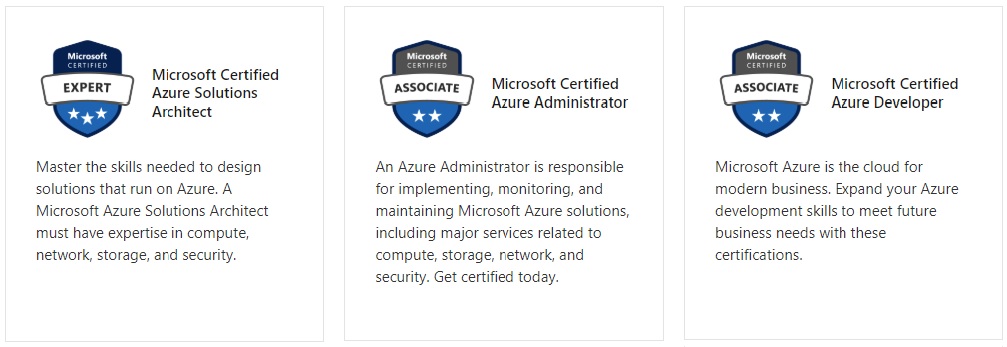
Microsoft Job Role-based Azure Certifications
Microsoft has aligned Azure certifications and training to job roles - focusing on Admin, Dev or Architect.
Each certification requires 2 exams and no certification has any prerequisite certification requirements.
Certification Camps has developed a comprehensive training / delivery format which focuses on learning beyond the core content accessible to any Microsoft training provider. Our program incorporates interactive demonstrations with explanations which go beyond the content of the book. Additional content, videos, labs & demonstrations are provided to expand on advanced topics - providing additional insight and perspective. Certification Camps training is not the typical book & PowerPoint presentation found at any local training center.
As a Microsoft Certified Partner with Gold Learning Competency - we adhere to the strict guidelines, standards and requirements to use Microsoft's exclusive curriculum. More over - our standards go beyond the "minimum requirements" set forth by Microsoft Learning.
We leverage our partnership benefits of courseware customization to build end to end technology training solutions. Students gain practical skills which can be implemented immediately.
At most training centers - learning starts on the first day of class and ends on the last day. Our boot camp training program is designed to offer resources before, during and after.
CERTIFICATION CAMPS FACILITIES
CAMPUS - Certification Camps built out a stand alone training center (not a hotel conference room) with spacious classrooms, new desk, Herman Miller Aeron chairs & comfortable common areas. Each student has a dedicated desk with two monitors. Each classroom has a maximum of two rows - so everyone is able to be engaged without the "back row" feeling. 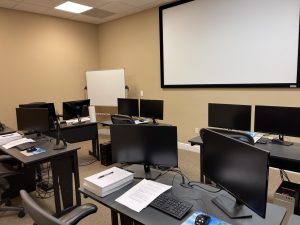
CLASSROOM EQUIPMENT - Students work on a dedicated Dell Client Desktop with 32GB memory with 512GB SSD drives - All Labs are executed the extremely fast Microsoft Data Center Hosted Lab Environment .
CAMPUS INTERNET - The campus is connected with a 1Gbps (1,000 Mbps) Verizon Fios Business Connection which provides complete internet (including VPN) access for students.
COMMON AREA - Amenties including snacks, drinks (Coffee, 100% juices, sodas, etc) all complimentary.
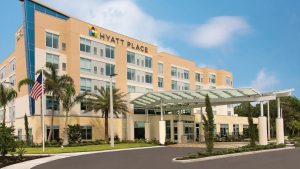
LODGING - We use the Hyatt Place Lakewood Ranch. This "upgraded" hotel offers extremely comfortable beds, great breakfast and very fast internet access.
NEAR BY - Many shops, restaurants and grocery options are available within walking distance. Additionally - the hotel provided scheduled shuttle services. Restaurants like Cheesecake Factory, California Pizza Kitchen, Panera Bread, Bone Fish Grill, Ruby Tuesday's, Five Guys, Chipotle, Chili's and over 20 additional choices in the immediate area.


